
Quick guide on what UTM's and Query Strings are and how to prep your team and strategy for easy source tracking in Funnelytics.
What are UTM's?
UTM's stand for "Urchin Traffic Monitor"
These are unique parameters that attach identifiable codes to the end of a web address and are critical to tracking traffic sources such as emails, social posts, adverts, pdf downloads and more.
UTM variables tell you where your customers are coming to your landing pages from — down to the specific ad, email, or other marketing assets you’re using to send traffic to the page. That’s why it’s important for you to know how to add UTM parameters so you can track everything.
UTM parameters are simply tags that you add to a URL. When someone clicks on a URL with UTM parameters, those tags are sent back to your Funnelytics workspace for tracking.
Here’s how these UTM parameters appear at the end of your URL.
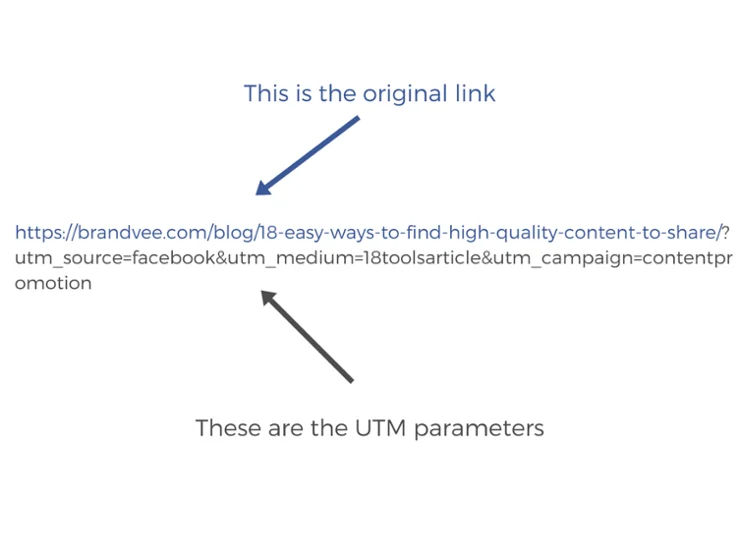
How to Generate URL Parameters
UTM parameters are a great way to figure out which URLs are most effective in attracting visitors to your content. So, is there a systematic way to append them to your URLs?
Fortunately, yes.
In order to simply visualize your traffic sources in Funnelytics, you’ll need to implement UTM and URL parameters. Then, ensure your team members and partners follow the defined naming convention and keep track of the parameters that are being added to your ads, emails, affiliate links, etc.
We’ve created this UTM management document (click here) to support you and your team with building and managing your UTMs.
IMPORTANT
Please, do not request access for any of these files as it won’t be granted. You must create your own copy and add it to your own Google account. Please do not request editing access. Additionally, you may want to edit the doc to suit your unique needs.
Google Sheet Instructions
Log into your Google Account
Open the File
Click File
Click Make a copy (this will make a copy of the file in your account)
Funnelytics ingests every parameter that is sent to your pages. The ability to visualize all parameters will allow you to visualize the direct and indirect relationship that each of your sources has on various different stages of your customers’ journey.
In this video, we'll show you how to use the Google Sheet linked to above.
Note:
Parameters are case sensitive
Avoid the use special characters or spaces in your parameters. It's recommended that you only use - and _.
These parameters all start with utm_ and are followed by their type (campaign, content, term, medium, source)
What are data maintenance best practices?
The world of web marketing and digital analytics is an ever changing landscape, and without proper planning, it can become easy to find yourself lost at sea. Not to worry! Ensure your team implements these 4 best practices to maintain data continuity.
1. Consistency is king
There are undoubtedly a number of different places where you are able to collect data points about your users. You likely have a vast array of forms, both active and “inactive” that are capturing critical pieces of information about your user base.
What do we mean by "inactive" forms? Those that are built but are not published/live, or those forgotten about, that your team don't think are being filled out.
However, despite all the different iterations of those forms and the various questions you may be asking, there will always be constants. Things like, name, email, perhaps company name and so on. You’ll want to establish a naming convention for these form fields so that regardless of what form these fields appear on, you are able to reference them with the same code snippet.
It might be that you give all the email form fields the ID “email”, or you may choose to use data attributes to define select fields. The method you should choose is whichever one best meets the needs of your tech stack, but the result you want to achieve is that consistent data points share the same identifier so that you don’t need to update your scripts every time you introduce a new form.
This doesn’t just apply to elements that a user might interact with, this applies to your UTM strategy as well. Remember, UTM parameters are case sensitive, so utm_source=facebook, is different from utm_source=Facebook. We should be consistent in our link tagging to avoid instances where we may not be accounting for certain channels, or incorrectly aggregating information.
2. Don’t make data collection an afterthought
We always want to move fast. After all, standing still means falling behind, but moving fast without data to guide the way is like running a race blindfolded.
Bake data collection into your campaign launch workflow. Ensure you know what information you’d like to collect and work with whomever is responsible for data collection to understand the best way to get all the data points you want. And be specific. For example, if you have a survey, but are really only interested in how people answer a single question, then there isn’t much sense in complicating your setup to include all the additional irrelevant information.
3. Not all data is created equal
We want to know all the things all the time. But when it comes to actionable data, unnecessary information creates noise and can distract you from your goals.
Be pointed with the data you are collecting, ask yourself, once I have this information, what am I going to do with it? If it falls under the umbrella of “nice to have” it’s most likely not going to serve you.
4. Stay organized
It’s really easy to continuously add tags triggers and variables to your GTM container and having done so, forget about them entirely. Running scripts can impact your site performance, so it’s not any good to have tags firing needlessly on pages. Try to use folders to organize your setups and make sure to perform audits every so often to pause, if not remove components that you aren’t using.
Additionally, when it does come time to make changes to existing tags, you want to be able to quickly identify what needs to be updated and keeping thing organized helps immensely, especially in instances where you may have multiple people contributing to the same GTM instance.